Maak kennis met Comfort Keys Pro
Comfort Keys Pro is een sneltoetsbeheerder van de Nieuw generatie waarmee u vaak herhaalde acties kunt automatiseren.
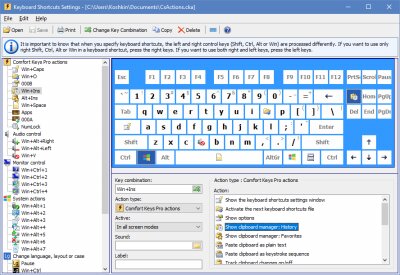
Functies van Comfort Keys Pro
Met Comfort Keys Pro kunt u toetsaanslagen blokkeren, de ene toetsaanslag door een andere vervangen of een sneltoets toewijzen aan een van de volgende acties:
| • | Een programma uitvoeren; een document of map openen. |
| • | Een of meer internetbronnen openen. |
| • | Vooraf gedefinieerde tekst plakken (telefoonnummer, link, adres, begroeting, handtekening, wachtwoord enz.). |
| • | De ingebouwde sjabloonmanager openen om snel fragmenten en afbeeldingen te plakken. |
| • | Een eerder opgenomen toetsaanslagmacro afspelen. |
| • | De ingebouwde klembordmanager openen. |
| • | Het ingebouwde schermtoetsenbord openen. |
| • | De taal van recent getypte tekens wijzigen. |
| • | De taal van geselecteerde tekens wijzigen. |
| • | Het hoofdlettergebruik van geselecteerde tekens wijzigen. |
| • | Het volume verhogen of verlagen; geluid dempen of weer inschakelen. |
| • | Het huidige venster minimaliseren, maximaliseren, herstellen of sluiten. |
| • | Het huidige venster verbergen of het laatst verborgen venster weergeven. |
Sneltoetsen die in het programma zijn geconfigureerd, werken in alle applicaties. Bij het opgeven van sneltoetsen kunt u willekeurige toetsen gebruiken, waaronder NumLock en CapsLock.
Wanneer u Comfort Keys Pro installeert, krijgt u ook de functies van verschillende andere Comfort Software-producten gratis:
| • | Comfort On-Screen Keyboard Pro. |
Comfort Keys Pro is eenvoudig te gebruiken in werkgroepen. Sla daarvoor het sneltoetsbestand op een netwerkbron op en configureer het voor gebruik op elk werkstation.
Bij het configureren van sneltoetsen worden de linker- en rechtermodificatietoetsen (Shift, Ctrl, Alt of Win) verschillend verwerkt. Daardoor kunt u meer sneltoetsen gebruiken en ze gemakkelijker bedienen. U kunt sneltoetsen ook anders laten verwerken in de volledig-schermmodus (u kunt bijvoorbeeld de Win-toets in computerspellen blokkeren).
Het ingebouwde schermtoetsenbord helpt u een handige sneltoetscombinatie te kiezen en toont vervolgens welke sneltoetsen momenteel beschikbaar zijn.
De software is volledig compatibel met Microsoft Windows 11 / 10 / 8.1 / 8 / 7 / Vista / XP.



