


Auxílio à Digitação
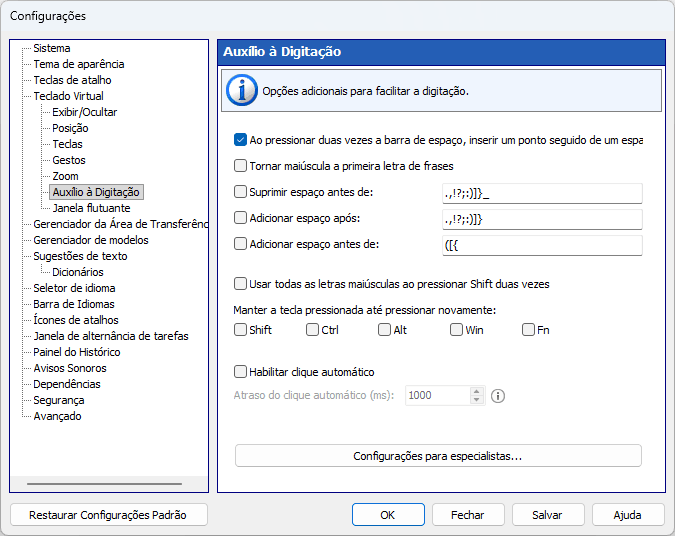
Recursos adicionais para digitação confortável no teclado virtual.
Ao pressionar duas vezes a barra de espaço, inserir um ponto seguido de um espaço
Você pode inserir um ponto seguido de espaço pressionando a barra de espaço duas vezes.
Tornar maiúscula a primeira letra de frases
Se um dos caracteres especificados for digitado, a tecla Shift será pressionada automaticamente.
Excluir um espaço antes
Se algum dos caracteres da lista for digitado e houver espaços antes desse caractere, os espaços serão removidos.
Adicionar espaço após
Se algum dos caracteres da lista for digitado, um espaço será adicionado após esse caractere.
Adicionar espaço antes
Se algum dos caracteres da lista for digitado e não houver espaço antes desse caractere, um espaço será adicionado antes dele.
Usar todas as letras maiúsculas ao pressionar Shift duas vezes
Tocar duas vezes em Shift no teclado virtual faz com que essa tecla permaneça pressionada. Toque em Shift novamente para soltá-la.
Mantenha para baixo Shift, Ctrl, Alt ou Win .até ser pressionada novamente
Quando você pressiona uma dessas teclas modificadoras, ela permanece pressionada até que você a pressione novamente.
Habilitar clique automático
Se você passar o mouse sobre uma tecla, ela será pressionada automaticamente com o intervalo especificado entre os pressionamentos. Esse recurso pode ser útil para pessoas com determinadas deficiências.
Atraso do clique automático (ms)
O tempo decorrido antes que um clique do mouse seja executado na posição atual do ponteiro do mouse.