Introducing Comfort On-Screen Keyboard Pro
Comfort On-Screen Keyboard Pro is an application displaying a unique virtual keyboard on the screen and allowing you to use the mouse pointer to type the way you do it with the regular keyboard.
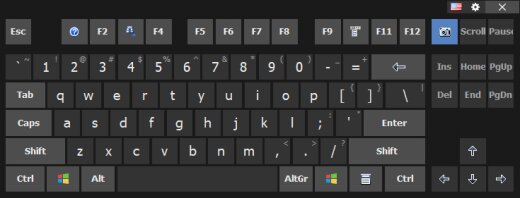
Comfort On-Screen Keyboard Pro supports all characteristics of the regular keyboard (for instance, repeated keystrokes when you hold down a key) and has additional advantages:
| • | Displaying the icons of shortcuts in Windows and popular applications. |
| • | Displaying characters actually typed in any language, which allows you to type text without a localized keyboard. |
| • | Customizing the keyboard appearance (the position, size and number of keys, the color and the skin) with the possibility to select it from a large number of available templates (without having to buy a new keyboard). |
| • | Color areas for fingers (if necessary) in case you learn to touch type. It is convenient because when you press a key, you can see it pressed on the on-screen keyboard. |
| • | Smart typing features make on-screen input more comfortable: double-tapping the space bar inserts a period followed by a space, the first letter of each sentence is capitalized automatically, and spaces before punctuation marks are removed. |
| • | Built-in word suggestions and autocomplete speed up text entry — the keyboard offers completions as you type, reducing the number of key presses. |
| • | Full touchscreen support with configurable gestures: swipe or tap with multiple fingers to show, hide, or reposition the keyboard without moving your hands away from the screen. |
| • | Ideal for users with limited mobility or physical disabilities, and for situations where a physical keyboard is unavailable — on a tablet, in a remote desktop session, or on a kiosk device. |
| • | The keyboard can float over any application window at any opacity level and be pinned to a screen edge, so it never obscures the content you are working on. |
| • | Access restrictions let you lock the keyboard to a specific layout, hide system keys, and prevent users from closing it — suitable for kiosk and point-of-sale deployments. |
The software is completely compatible with Microsoft Windows 11 / 10 / 8.1 / 8 / 7 / Vista / XP.



