


Settings
When developing Comfort Keys Suite, we tried to keep the number of optional settings to a minimum, leaving only those that are truly necessary.
To open the Settings dialog box, right-click the Comfort Keys Suite icon in the system tray and select the All Settings item in the context menu.
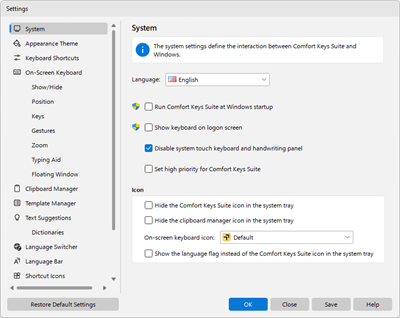
The buttons at the bottom of the window are common for all pages: “Restore Default Settings” resets the settings to their default values, “Save” applies the changes without closing the window, “OK” applies them and closes the window, “Close” closes the window without applying unsaved changes, and “Help” opens the help topic for the current page.