版本历史记录
版本 9.6.2(6 月 3 日发布,2026)
- 修复: 修复了在剪贴板管理器中将带有 URL 的项目添加到收藏夹时出现的错误。
- 修复: 修复了在剪贴板管理器中设置项目颜色时出现的错误。
版本 9.6(5 月 15 日发布,2026)
- 新增: 将 ToggleClipboard.exe 文件添加到主程序文件夹中,该文件可以固定到任务栏以快速访问剪贴板管理器。

- 新: 刷新命令(F5 热键)已添加到剪贴板管理器中。当无法在网络文件夹中跟踪剪贴板文件更改时,这会有所帮助 - 按 F5 手动重新加载数据。
- 改进: 更新了剪贴板管理器中的重复检测逻辑。
- 改进: 从剪贴板管理器保存多个片段时,程序现在要求分隔符(与合并片段时的行为相同)。
- 已修复: 在剪贴板管理器中,将剪辑保存到文件时,文件扩展名现在会在更改文件类型后正确更新。
- 改进: 跨多个语言环境的精致 UI 翻译.
- 改进: 添加了西班牙语、德语、法语和意大利语的本地化帮助。
- 其他一些错误修复和改进。
版本 9.5(5 月 17 日发布,2022)
- 新: 已添加计划检查更新:设置 > 高级 > 检查更新 .
- 更改: 对于添加到例外的应用程序,剪贴板跟踪将暂停,但剪贴板管理器窗口不会关闭。
- 改进: 如果未设置过滤器,复制到剪贴板的新片段将在剪贴板管理器的历史记录中变为活动状态。
- 已修复: 将图像从 Google Chrome 保存到剪贴板已修复。
- 已修复: 如果“历史记录”部分为空并且未选中“不添加相同片段”设置,则剪贴板跟踪会停止。
- 已修复: 系统托盘中程序图标消失的问题已修复。
- 许多其他修复和改进。
版本 9.4(5 月 28 日发布,2021)
- 改进: 添加了一个额外的请求,用于在加密和解密密码发生更改时重新加密数据库。当在多台PC上使用共享剪贴板目录时,只需在其中一台PC上重新加密数据库即可。
- 改进: 如果将剪辑添加到收藏夹组,剪贴板管理器会显示收藏夹图标。
- 改进: 剪贴板管理器中添加了“键盘快捷键”过滤器。使用此过滤器,您可以找到您之前设置了快速粘贴键盘快捷键的所有剪辑。
- 改进: 剪贴板更改的处理已得到优化。
- 改进: “不添加相同片段”功能已得到改进。如果禁用它,粘贴后的片段将添加到列表顶部。
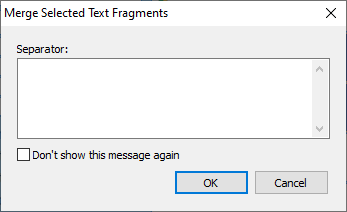
- 改进: 添加了一个新表单,用于在合并所选文本片段时请求分隔符。
- 修复: 使用复制时,Sound Forge Audio Studio 无法再播放音乐。声音片段不会在剪贴板中跟踪,因为这会导致操作系统出现错误。
- 其他一些错误修正和改进.
版本 9.3(3 月 27 日发布,2021)
- 改进: 将视频文件复制到剪贴板时会出现缩略图。
- 改进: 重新启动系统后,将恢复剪贴板的最后内容。
- 改进: 程序在高 DPI 屏幕上的工作已得到改进和修复。
- 新: 剪贴板管理器中的字体大小取决于系统字体大小。另请参阅: 如何更改 Windows 10 中的文本大小
- 新: 添加了波斯界面语言。
- 固定: 如果在剪贴板管理器中为片段分配了快捷键,那么当再次将此类片段复制到剪贴板时,现在不会删除它。
- 其他一些错误修复和改进.
版本 9.2(3 月 5 日发布,2020)
- New 添加了“Windows Light”样式。 “Windows 10”风格已更名为“Windows Dark”。部分样式略有修改.
- New 命令行参数 /EVENTLOG 已添加。它指示应用程序为每次启动创建不同的日志文件。
- 已修复: 有时剪贴板管理器中会出现相同的片段。
- Fixed 将多个片段保存到剪贴板管理器中的文本文件时分隔符不���确。
- 许多其他修复和改进。
版本 9.1(5 月 2 日发布,2019)
- 新增: 已添加日语界面语言。几乎所有用户界面语言都得到了改进。
- 新: 已为剪贴板管理器添加附加信息设置。您可以选择为每个剪辑显示哪些信息:大小、日期和时间或来源.
- 新: “设置”按钮已添加到剪贴板管理器中。
- 新增: 对于 HTML 片段,源信息已添加到剪贴板管理器的预览区域。
- 新: 添加了对 jpg、png、gif 和 bmp 的支持,当您右键单击图片并在浏览器、邮件或任何其他可以显示图片的程序中单击“复制图片”时,它们将显示在“过滤器:图片”中。
- 新: 添加了“URL”过滤器,显示以“http://”、“https://”或“ftp://”开头的所有剪辑。
- 改进: 添加了一项附加检查,禁止启动程序的多个实例。
- 改进: 剪贴板管理器的数据目录可以在多个用户之间共享。当一名用户更改数据时,其他用户的数据也会更新。您还可以使用共享网络文件夹或 Google Drive 或 Microsoft OneDrive 等服务。
- 改进: 已删除命名剪辑的标签“名称:”。
- 改进: 剪贴板管理器窗口的预览区域现在取决于屏幕比例。
- 改进: 当您调整剪贴板管理器窗口的大小时,按钮的大小会减小以显示所有按钮。
- 修复 在剪贴板管理器中编辑文本剪辑时的问题:第一个字母后插入了空格.
- 许多其他修复和改进。
版本 9.0.4(1 月 11 日发布,2018)
版本 9.0(12 月 7 日发布,2017)
- 新 设计和新图标.
- 已添加新 样式:Windows 10、彩色、Android。样式顺序已更改。
- 改进 当“文本、应用程序和其他项目的大小”超过 200% 时,对 Microsoft Surface 等设备上的高 DPI 显示器的支持。
- 固定: 现在,剪贴板管理器会在必要时显示在文本光标旁边。
- 已修复: 现在剪贴板管理器隐藏在 Windows 10 的登录屏幕上。
- 已修复 计算机重新启动的问题.
- 其他一些错误修复和改进。
Version 7.5 (released February 2, 2017)
- Improved Windows 10 Compatibility.
- Improved: Right clicking on the item in the clipboard manager makes the clicked item active.
- Improved: The “Paste as HTML Text” action in the clipboard manager now supports multi-language text.
- Improved Dutch language interface.
- Fixed issue with computer restart.
- Some other bugfixes and improvements.
Version 7.4 (released October 29, 2015)
- Improved Windows 10 Compatibility.
- New: Slovenian interface language has been added.
- Some other improvements and bug fixes.
Version 7.3 (released April 17, 2015)
- New “Single line” option for the clipboard manager. This option lets you display rows in the list of clips in a special way: Each row will become smaller in height and will contain only one line.
- New: Users can now add new colors for saved fragments in the clipboard manager.
- Improved the Search box in the clipboard manager. When you start typing, the search begins automatically. When you are finished with the search, you can clear the search by pressing Esc key.
- Other improvements and bug fixes.
Version 7.2 (released December 2, 2014)
- New: A volume control has been added in the "Sounds" section of the Options dialog box.
- New command line parameters for the application have been added: /HELP and /?. They instruct the application to display the list of accepted command line parameters in a message box, and then exit.
- Improved: Compatibility with 64-bit versions of Windows has been improved. New files has been added: ClipboardCm64.exe, CClipboardH64.dll
- Improved: When saved settings are loaded, the toolbar's state is restored.
- Improved: Detection of active window change by clipboard manager has been improved.
- Fixed: When the clipboard manager was closed by pressing the Esc key, the previous active window didn't become active.
- Lots of other fixes and improvements.
Version 7.1 (released January 27, 2014)
- Improved DPI Scaling support.
- Improved application icons.
- Fixed: Issue with incorrect text cursor detection in 64-bit systems.
- Fixed: Sometimes a blank button appears in the taskbar.
- General fixes and various minor improvements.
Version 7.0 (released December 6, 2012)
- Comfort Clipboard Pro has been tested to meet all of the technical requirements to be Windows 8 Compatible.
- Improved: Setting "Show the toolbar in the taskbar" has been added for 64-bit systems.
- Improved: The default settings have been changed.
- Improved: Color schemes have been slightly adjusted: Summer, Dark, and Night.
- New option "Windows 8 Style" in the "Appearance" section - when enabled, rounded corners of windows and buttons are turned off.
- New: The Ctrl+F (switch to the search field) hotkey combination in the clipboard manager has been added.
- New: Ability to backup and restore the clipboard clips has been added.
- New: Fragments of the clipboard can be manipulated as files if you drag them to Windows Explorer, Browser or Paint.
- Improved: The limit for pasting text as keystrokes has been removed. You can interrupt pasting with Escape key.
- Improved: Unicode support for the system tray icon notification tooltip has been added.
- Improved: Ability to search by fragment name has been added.
- New: Slovak interface language has been added.
- Code optimization and various minor improvements.

